
Instruction manual


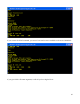


Now switch to CP/M by entering the monitor cpm command. When CP/M starts (it does a warm boot
here), it copies its code from the disk to the memory locations from 0xE400 and higher, but leaves the
rest of the memory undisturbed. So, the image of the RAM monitor at 0x0100 is safe.
Now, we can use the SAVE command to create the file MONITOR.COM. We have to tell CP/M how
many memory pages to save (one page = 256 bytes). If we divide the size of the monitor.bin file by 256
we get 2008/256 = 7.84. This means we need to save at least 8 pages of memory with the SAVE
command. Give the file the name MONITOR.COM:
33