
Instruction manual


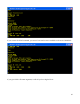


Then, we run some tiny code (again entered with the load command) to switch to memory
configuration 1 and run the RAM monitor:
0800 D3 01 out (1),A ;switch to memory configuration 1 (all-RAM)
0802 C3 00 DC jp 0DC00h ;jump to start of RAM monitor
Now you see a monitor prompt (>), but it is from the RAM monitor, and not the ROM monitor. To
verify this, look at the first page of memory with the dump command:
There you see the CP/M warm start jump command at location 0x0000 with some other data. If we
were still in memory configuration 0, this area would be filled with ROM code.
Now, using the RAM monitor, we can load the monitor.bin file again, this time at 0x0100:
32