
Instruction manual






binary file into memory at 0x0100 , switch to CP/M, and use the built in SAVE command to create a
.COM file.
So how to get the RAM monitor program itself into memory, and onto the CP/M disk? We “bootstrap”
it, using the RAM monitor program itself. It is a little complicated, but you only have to do this once.
Here is how.
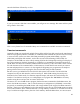
First, we start CP/M with the monitor cpm command. This puts the CP/M system into the memory, and
sets up memory page 0 (addresses 0x0000 to 0x00FF) with the data CP/M needs to operate. Then, we
reset the computer. We see the ROM greeting again. The system reset causes the memory configuration
to switch back to configuration 0, so we can use the ROM monitor, but it does not disturb the CP/M
memory page 0, or the CP/M code in high memory:
Now, using the ROM monitor, we will place the RAM monitor program (file name monitor.bin) into
high memory, but below CP/M.
The RAM monitor code's short prefix, which is used to relocate the file, means that we should load the
file at 0xDBF2. Then, the RAM monitor code proper will start at 0xDC00 as designed. But, the ROM
monitor uses stack space at 0xDBFF, so if we bload the file at 0xDBF2 the stack will be overwritten.
To solve this problem, we just move the stack out of the way first with these commands:
0800 31 EF DB ld sp,0DBEFh ;move stack pointer out of the way
0803 C3 6F 04 jp 046Fh ;ROM monitor warm start
We use the load command to put these bytes into memory at 0x0800 and execute them with run:
30