
Instruction manual


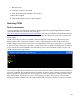




enter the disk letter followed by a colon:
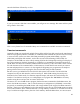
If you try to access a disk that is not available, you will get an error message. Hit return and the system
will go back to the A disk:
This is a very limited set of commands. Many more commands are available as transient commands.
Transient commands
Originally, CP/M was created with multiple floppy disks, and the first disk came from the manufacturer
with lots of programs (transient commands, or .COM files) that extended the system so that it was easy
to create text files (with a text editor, ED.COM), assemble programs (ASM.COM), copy files
(PIP.COM), and display disk statistics, such as file size and room remaining (STAT.COM). For
example, if STAT.COM was on the A disk, entering STAT at the CP/M prompt would give a display of
the room remaining on the disk. Essentially, a .COM file is a command that extends the functions of
CP/M. When one enters the command, CP/M searches the directory of the current disk, and if it finds a
file with the name of the command and a .COM extension, it loads that file into memory at location
0x0100 and jumps there to execute it. In the original CP/M, getting new programs was as simple as
putting a disk in drive B, and copying the files from that disk using the PIP command.
But how can we get CP/M files into the CPUville Z80 system from outside? The CPUville Z80
computer has only one disk interface, and one serial port. With CP/M running, the serial port is
dedicated to the CP/M console, for character input and output, and cannot be used for binary file
transfers. If we had two serial ports, we could perhaps use a program like XMODEM to do binary
transfers using the second port, but we cannot do that here.
The answer is to use a RAM monitor program, that has the same commands as the ROM monitor, but
runs in the CP/M environment – that is, with the memory in configuration 1 (all-RAM). I created this
program by re-assembling the ROM monitor with a target address (code origin) of 0xDC00 instead of
0x0000. I had to put some additional code at the start that copies the rest of the RAM monitor program
from location 0x0100, where CP/M would load it, to high memory at 0xDC00, so it would be out of the
way of code that we might want to place into lower memory. With a RAM monitor, we can bload a
29