
Instruction manual


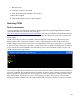


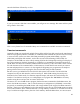


We will use the bload command to first place the file cpm_loader.bin into the computer memory, then
use the diskwr command to put it into sector 0 on the hard disk:
Now that the disk is set up to run CP/M, enter the cpm command at the monitor prompt (you might
need to reset the computer to get it to work properly):
You now see the CP/M prompt, A>, which indicates that CP/M is running, and that disk A is active.
To summarize, these are the steps to install CP/M 2.2:
1. Load z80_cbios.bin at 0xFA00
2. Load format.bin at 0x0800
3. Run format.bin
4. Load cpm22.sys at 0xE400
5. Load z80_cbios.bin at 0xFA00
6. Load putsys.bin at 0x0800
25