
Instruction manual






This is important to remember, because in order to prepare the disk, we will need to use the CBIOS
calls for writing 0xE5 to the disks. That way, we will write the sectors as CP/M will see them when it
creates the file system directory entries.
The format program calls to the CBIOS to write 0xE5 to all the sectors of the four CP/M disks in our
system. In order to work properly, the CBIOS code needs to placed into the system memory at location
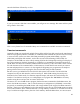
0xFA00 before we load and execute the format program. Use the monitor bload command, and a
binary transfer to load the file z80_cbios.bin into the computer memory at 0xFA00:
Note the file length in this example may be different from yours if you are using a later version of
z80_cbios.bin. Look at the file Properties to get the exact size before you make the transfer.
Next, load the format.bin file into memory at 0x0800:
Now, run the format program using the run command:
22