
Instruction manual
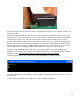


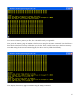


If you see your data pattern there, you know your disk is working properly, and you can read and write
sectors. You can experiment with other patterns, other memory locations and other sectors.
Once the disk is working properly you can install CP/M onto the disk.
Installing CP/M version 2.2
About CP/M
The CP/M operating system was the first commercially successful disk operating system for
microcomputers. As such, it recently received designation by the IEEE as a Milestone in Electrical
Engineering and Computing. See the article at http://theinstitute.ieee.org/technology-focus/technology-
history/groundbreaking-operating-system-is-named-an-ieee-milestone.
This operating system was designed by Gary Kindall in 1974, to run on microcomputers with an 8080
processor and 8-inch IBM floppy disks. However, it was designed to be portable to many different
machine architectures, by having a machine-dependent, customizable basic input-output system
(CBIOS) that had the software to operate the disks, console and other peripheral hardware, and a
machine-independent basic disk operating system (BDOS) and console command processor (CCP), to
process commands and create and use a disk file system. Since the 8080 processor uses a subset of the
same machine code as the Z80, CP/M could be used on both 8080 and Z80 machines. CP/M use
spread to a wide variety of machines using a wide variety of disk drives and peripherals. Eventually,
the introduction of 16-bit microcomputers using MS-DOS made 8-bit microcomputers (and CP/M)
obsolete, but it is still used and enjoyed by hobbyists and educators using 8-bit Z80 or 8080 systems.
CP/M Source Code
Even though CP/M is obsolete, it is not yet in the public domain. The operating system was originally
owned by Digital Research, Inc. It was passed to a spin-off named Caldera, Inc., and then to Lineo, Inc.
18