
Instruction manual




sector if you want to use this command to start the operating system. I suggest you do not try to
preserve partitions on your disk, but rather dedicate the disk for use on the Z80 computer for
experimentation and to try the CP/M operating system.
With the disk drive connected, apply power to the computer and take it out of reset. You should again
see the greeting message and get the monitor prompt.
To test the disk, we will use the load command to place an easily recognizable data pattern into the
computer memory, then write this pattern to a disk sector using the diskwr command. Next, we will
read it from the disk and place it in a different area of memory using the diskrd command. Then, we
will examine this second memory area with dump, and look for that data pattern. If we see the pattern,
we know that the disk write and read commands worked correctly. Here is the detailed test procedure.
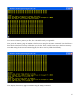
First, examine the memory page (that is, the 256 bytes of memory) at 0x0800 using the dump
command:
The memory will contain random data at system power-on. Your memory data will probably look
different than this.
Now, load this area of memory with an easily recognizable pattern of data using the load command:
16