
Instruction manual
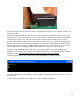


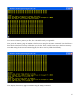


If the memory test fails, recheck the pins of the RAM ICs to make sure they are seated properly. If you
cannot get it to work, please contact me for advice.
If the memory test works, we can be confident that the board is built correctly. Now, put the computer
in reset, and disconnect the power, and connect a disk drive as described in the following section.
Connecting a disk drive
The disk and memory interface will work with most IDE disk drives (see the Table of Tested Disk
Drives at the end of this manual). The disk size should be 150 megabytes or higher. This is not to have
enough room, because a full-blown CP/M system uses only about 1 megabyte of disk space, but
because the CP/M system described here uses simplified code that does not use disk space very
efficiently. In particular, it uses simplified arithmetic to map CP/M sectors onto the LBA sectors of the
hard disk, which skips a lot of space. Also, the CP/M system I developed uses only 128 bytes of each
sector for data. This is the native sector size that CP/M uses, since it came out of the era in the mid-
1970s when only floppy disks were used, and those disks used 128-byte sectors. CP/M offers blocking
and deblocking code to more efficiently use disk space, by taking 256- or 512-byte sectors and
breaking them into 128-byte pieces, but I did not use this code in my system, again out of a desire to
13