
Instruction manual


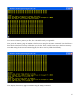


You see the same set of commands used in the monitor program version 7, with some new additions.
They are diskrd, diskwr, and cpm.
The diskrd command
This command reads one sector from the disk and writes it into memory at a location you specify. The
command takes as input the memory address where the disk data is to be placed as a 4-digit
hexadecimal number, and the sector number as a decimal logical block address (LBA) from 0 to
65,535. It reads 256 bytes from the sector, and places this data into memory. Note that the command
will read sectors using a 16-bit LBA, but the subroutine underlying the command will take a full 24-bit
LBA, and you can write programs to take advantage of this.
The diskwr command
This commands takes 256 bytes of data from memory and writes it to one sector of the disk. Like the
diskrd command, it takes as input the memory address of the data to be written as a 4-digit
hexadecimal number, and a 16-bit decimal LBA for the sector to write. Both diskrd and diskwr
need the LBA to be without leading zeros – if you add them, the routines will hang.
The cpm command
This command loads 256 bytes of data from the first sector of the disk (LBA 0x000000) into memory
location 0x0800, then jumps to it. The program in that sector is used to load and start CP/M, but can be
used to start any other operating system the user might care to put on the disk.
Do not execute these commands at present. Since there is no disk attached, the system will hang. If the
system hangs, just reset the computer to start over – no need to disconnect power.
Testing the memory expansion
I have written a brief program to verify the presence of 64K RAM, and that the memory configuration
flip-flop is working correctly. This program will work without a disk attached. To do the test, use the
bload command to load the memory_test.bin file into memory at location 0x0800, then the run
command to execute it. If successful, it should print output as below:
12