
Instruction manual
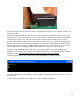




Do the same with the serial interface board, on the right-side connectors. Do not connect a disk to the
board at this time.
The main computer should have the fast clock selected, and be in Reset. Now, connect power to the
computer board. The Power indicators on the disk and memory expansion and serial interface boards
should light up. If they don't, check the ribbon cable connectors again to ensure they are seated
properly. Once the Power LEDs are on, check the ICs to make sure none of them are getting hot (can
happen if you solder one in backwards by mistake). If everything is OK, connect the serial interface
board to a PC serial port using a straight-through serial cable (not a “null modem” crossover cable).
The serial interface is configured as 9600 baud, 8 data bits, no parity, one stop bit (8-N-1).
On the PC, start a terminal emulation program. I will use the RealTerm program running under
Windows XP on a PC for these examples. For detailed instructions on using RealTerm with the Z80
computer, see the CPUville Z80 Computer Serial Interface Kit Instruction Manual.
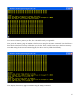
Take the computer out of reset. You should see the short ROM v. 8 greeting message:
Note that in ROM version 8 and higher, some messages have been shortened to create more room for
program code.
At the monitor prompt enter ? Or help to see a list of available commands:
11