
Owner's manual



68
None
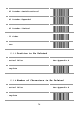
5.2.4 Position to Be Inserted
Decimal Value See Appendix A
Complete
5.2.5 Characters to Be Inserted
ASCII Table
See Appendix B and C
Complete
5.3 Character Deletion
To setup the deletion of output characters:
1. Scan the programming code of the desired set.
2. Scan the programming code of the desired symbology.
3. Go to the Decimal Value Table in Appendix A. Scan
programming codes that represent the desired
position to be deleted.
4. Scan the “Complete” programming code of “Character
Position to Be Deleted”.
5. Go to the Decimal Value Table in Appendix A. Scan
programming codes that represent the number of
characters to be deleted.
6. Scan the “Complete” programming code of “Number of
Characters to Be Deleted”.