Color Copy Reference Operating Instructions
Manuals
Brands
Savin Manuals
All in One Printer
2555
71
72
73
74
75
76
77
78
79
80
Co
pyin
g
174
2
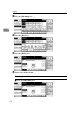
A
Press the
[
Edit/Stamp
]
key.
B
Press the
[
Eras
e
]
key.
C
Press the
[
Border
]
key.
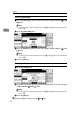
D
Set the erase borde
r width.
Selecting
[
Same Widt
h
]
A
Press
the
[
Same Wi
dth
]
key.
1
...
...
73
74
75
76
77
...
...
109