User's Manual
Manuals
Brands
SATO Manuals
All in One Printer
SATO All in One Printer GL 4xxe
26
27
28
29
30
31
32
33
34
35
31
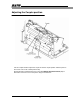
4. Adjusting t
he Coupler p
osition
Remove the
thumbs
crew
that
secures
the lower front
cover to the
printer.
Slide
the cover
to
the left
(toward t
he
electric
al half
of the pri
nter)
to remove it
.
1
...
...
29
30
31
32
33
34
...
35