
User manual





73
Calibration and Adjustment
User Manual for Secura, Quintix, Practum
Automatic Calibration/Adjustment
with isoCAL
Fully automatic calibration/adjustment ensures that the balance is automatically
calibrated and adjusted when predefined time intervals or temperature values are
exceeded.
This function varies in different models:
– Secura
®
: isoCAL is automatically carried out based on time or temperature,
andeach time the balance is leveled. This function can be switched off via the
system settings (see “Calibration/Adjustment” on page28).
– Quintix
®
: isoCAL is automatically carried out based on time or temperature.
Thisfunction is always active and cannot be switched off.
In Secura
®
models, every adjustment process, including the identified deviations,
isdocumented and saved on the balance. The saved reports can be viewed via the
system settings and printed out on a PC or Sartorius lab printer (see “Calibration/
Adjustment” on page28).
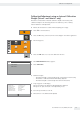
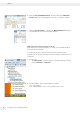
0.00
Max 2100 g d
=
0.01 g
isoCAL
y If the ambient temperature has changed since the last calibration/adjustment
or the preset time interval has been exceeded, the red isoCAL button appears
on the display.
y If the isoCAL function is set to Automatic, the calibration/adjustment process
starts automatically.
! If the balance has not been adjusted, the prompt will be shown again
5 minutes after the “isoCAL” status message is confirmed.
y If the isoCAL function is set to Info, manual start, the function must be started
manually.
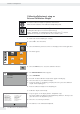
isoCAL
t To start the calibration/adjustment function manually, select the isoCAL
button (Secura
®
, Quintix
®
).
y Calibration begins automatically.
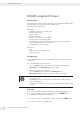
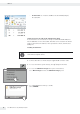
Date and Time: 14-Jun-2012 15:18
Calibration function: Internal calibration
Start calibration: Start: isoCAL (Niv)
Calibration deviation: Dev -0.01 g
Adjustment function: Internal adjustment
Adjustment deviation: Dev 0.00 g
Report
y A report appears on the display (Secura
®
and Quintix
®
only).
The report indicates the deviations identified during isoCAL calibration.
Thereport also gives the result of the adjustment process.
t Select < to close the report window.
y The balance is now calibrated and adjusted.