
User manual



30
System Settings (Setup Menu)
User Manual for Secura, Quintix, Practum
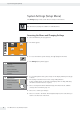
Ambient conditions menu option:
t Choose whether the conditions at the balance location are Stable or Unstable.
If Unstable is selected, adverse ambient conditions (drafts, vibrations) are
filtered by changing the measurement time for the weight values.
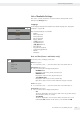
Application menu option:
t Choose whether the balance will be used for Weighing or Dosing.
This setting is used to compensate for load fluctuations on the display.
– Weighing: The display responds very quickly to fast load changes.
Thedisplay responds more slowly to small changes in weight (in the digit
range). This setting is suitable for normal weighing.
– Dosing: The display responds quickly to small changes in weight, making
itfaster and more accurate for additional dosing and container filling
functions.
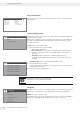
Stability signal menu option:
t Choose whether stability is shown with High accuracy, Medium accuracy,
orFast on the display.
The balance stability is displayed as soon as the weighing result is constant
within a defined range. Until stability is reached, the measured values is shown
in gray on the display and only turns black once the balance is deemed stable.
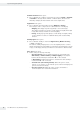
Zero / Tare menu option:
t Define settings for zeroing and taring.
– Zero/Tare function: Choose whether the balance is zeroed and tared
With stability or Without stability. If Without stability is selected, the
balance will automatically be tared when A or D is selected.
If With stability is selected, the balance is tared the next time stability is
reached after A or D is selected.
– Automatic zero (zero tracking function): When this option is active,
changes of a set fraction of scale intervals per second from the display zero
point are zeroed automatically.
– Zero/Tare at power on: When this option is active, the balance is
automatically zeroed or tared when switched on.