
User manual



27
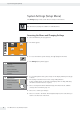
System Settings (Setup Menu)
User Manual for Secura, Quintix, Practum
List of Available Settings
This section contains information on all basic balance settings which can be
defined in the Settings menu.
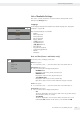
Language
Language
Deutsch
Français
English
Español
Set the display language here. English is the default language (see “Setting the
Language” on page20).
The following languages are available:
– English
– Deutsch (German)
– Français (French)
– Español (Spanish)
– Italiano (Italian)
– 日本語 (Japanese)
– Pусский (Russian)
– ㅩ昝/ 㖶措 (Chinese)
– Polski (Polish)
– Português (Portuguese)
– ዽ࿌/ Ⴎ໓ (Korean)
– Turkish
– Hungarian
Date and Time (Secura
®
and Quintix
®
only)
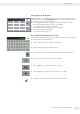
Date and time
Date
Date format
Time
Time format
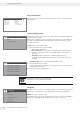
Set the date, time, and display format here.
Date menu option:
t To set the date, select t, enter the current date, and confirm withl.
Date format menu option:
t Choose how the date is displayed and printed.
– DD-MMM-YYYY:
Displayed in order of day, month, and then year.
– MMM-DD-YYYY:
Displayed in order of month, day, and then year.
–
YYYY-MM-DD (ISO):
Displayed in order of year, month, and then day.
(The time is given in 24-hour format when this setting is selected.)
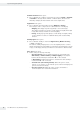
Time menu option:
t To set the time, select t, enter the current time, and confirm withl.
Time format menu option:
t Choose how the time is displayed and printed.
– 24h:
The time is displayed in 24-hour format. (This is the only possible setting
when the date format is set to ISO.)
– 12h (AM/PM)
The time is displayed in 12-hour format. Times shown before noon are
marked with AM, and times shown after noon are marked with PM.