
User manual



21
Using the Balance
User Manual for Secura, Quintix, Practum
Operating Concept
This section describes the operational possibilities of your balance.
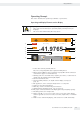
Operating and Display Elements on the Display
Sharp or pointed instruments (such as ballpoint pens) can damage the device.
– The touch screen should only be operated by lightly touching it with your
fingertips.
This can be done while wearing laboratory gloves.
Max 220 g d
=
0.0001 g
41.9765
Component
1
+
Net
LEVEL
G
SQmin 3.0500 g
1
2
3
4
5
6
7
8
9
13
12
10
11
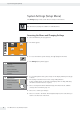
1 Toolbar with currently available buttons:
Zero, Tare, and possibly Print (data output) and GLP printout
2 Metrology line (additional info for minimum capacity Min and the verification
scale interval e appear on verified balances)
3 Warning symbol for calculated values, negative gross values, or values that are
smaller than the minimum initial weight (SQmin)
4 Current measurement value
5 Unit and stability indicator; set weight unit and display accuracy (see
page39)
6 Run application, such as saving the weight value of a component
7 Settings for the selected application
8 Menu key: switch to menu and functional selection
9 SQmin minimum weighing (Secura
®
only; see page41)
10 Bar graph: scaled measurement value display (percentage weighing capacity)
11 Preceding symbol (±) for weight value
12 Display value ID, e.g. “G” for gross value, “Net” for net value; switch display
value for application, such as net value, total value, weight value, or calculated
value
13 Field for status and warning displays, and activation of isoCAL and leveling