
User's Manual




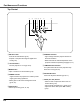
Table Of Contents

8
Bottom
Back
① Focus Lever
② Projection Lens
③ Lens Cover
(See p. 53 for attachin�)
④
⑥
⑬
⑪ ⑫
⑨
⑩
CAUTION
Hot air is exhausted from the exhaust
vent. Do not put heat-sensitive objects
nearthisside.
②
⑤
③
④
Front
⑧
⑦
CAUTION
Do not turn on the projector with putting
the lens cover on. The light beam may
damage lens cover and result in fire
hazard.
Attach the lens cover while the projector
isnotinusetoavoid scratchingthelens
surface.
⑤ Infrared Remote Receiver
⑥ Top controls and Indicators
⑦ Speaker
⑧ Air Intake Vent
⑨ Power Cord Connector
⑩ Terminals and Connectors
⑪ Lamp Cover
⑫ Air Filters
⑬ Adjustable Feet
①
④ Exhaust Vents
Kensin�ton Security Slot
ThisslotisforaKensingtonlockusedto
detertheftoftheprojector.
*Kensington is a registered trademark ofACCO
BrandsCorporation.
⑧
Part Names and Functions
①