
User's Manual




Table Of Contents
61
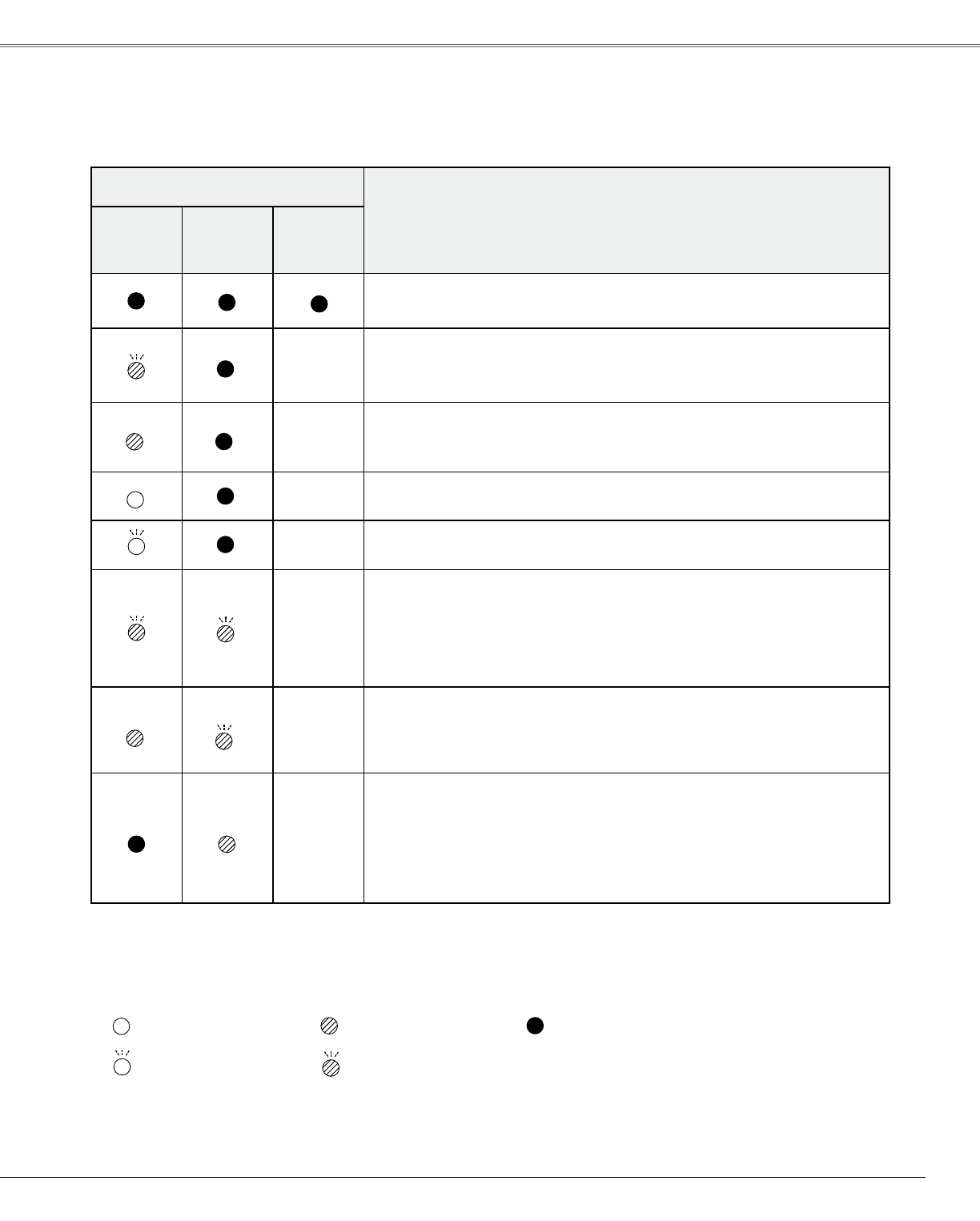
Indicators
Projector Condition
POWER
red/�reen
WARNING
red
LAMP
REPLACE
yellow
Theprojectorisoff.(TheACpowercordisunplugged.)
The projector is preparing for stand-by or the projection lamp is
beingcooleddown.Theprojectorcannotbeturnedonuntilcoolingis
completed.
TheprojectorisreadytobeturnedonwiththePOWERON/STAND-BY
button.
Theprojectorisoperatingnormally.
TheprojectorisinthePowermanagementmode.
Thetemperatureinsidetheprojectorisabnormallyhigh.Theprojector
cannotbeturnedon.Whentheprojectoriscooled down enough and
the temperature returns to normal, the POWER indicator lights red
and the projector can be turned on. (The WARNING indicator keeps
blinking.)Checkandcleantheairfilters.
The projector has been cooled down enough and the temperature
returns to normal. When turning on the projector, the WARNING
indicatorstopsblinking.Checkandcleantheairfilters.
Theprojectordetectsanabnormalconditionandcannotbeturnedon.
UnplugtheACpowercordandplugitagaintoturnontheprojector.If
theprojectoristurnedoffagain,unplugtheACpowercordandcontact
thedealerortheservicecenterforserviceandcheckup.Donotleave
theprojectoron.Itmaycauseanelectricshockorafirehazard.
Checktheindicatorsforprojectorcondition.
•••green.
•••red •••off
•••blinksgreen.
Whentheprojectionlampreachestheendofitslife,theLAMPREPLACEindicatorlightsyellow.
Whenthisindicatorlightsyellow,replacetheprojectionlampwithanewonepromptly.Resetthelamp
replacementcounterafterreplacingthelamp.Seepages54-55.
Indicators and Projector Condition
•••blinksred.
Appendix