
User's Manual


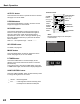


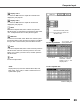

Table Of Contents

AutoPCAdjustmentfunctionisprovidedtoautomaticallyadjustFinesync,Totaldots,Horizontal,andVertical
positionstoconformtoyourcomputer.
Move the red frame pointer to the
Auto PC adj. item and press the
SELECTbutton.
“Pleasewait...”appearswhileAuto
PCadjustmentisinprocess.
PC Adjust Menu
PCAdjustMenuicon
To store the adjusted parameters
ThesystemparametersadjustedintheAutoPCAdjustment
canbestoredintheprojector.Onceparametersarestored,
thesettingcanbedonejustbyselectingaModeinthePC
SystemMenu(p.26).See“Store”onpage29,fordetails.
Note:
•Finesync,Totaldots,Horizontal,andVerticalpositionsof
somecomputerscannotbefullyadjustedwiththisAuto
PCAdjustmentfunction.Whentheimageisnotprovided
properlywiththisoperation,manualadjustmentsare
required(pp.28–29).
•TheAutoPCAdjustmentcannotbeoperatedwhen480i,
575i,480p,575p,720p,1035i,or1080iisselectedinthe
PCSystemMenu(p.26).
Auto PC Adjustment
PresstheMENUbuttontodisplaytheOn-Screen
Menu.UsethePoint◄►buttonstomovethered
framepointertoPCAdjustMenu.
1
2
UsethePoint▲▼buttonstomovetheredframe
pointertoAutoPCadj.andthenpresstheSELECT
buttontwice.
Auto PC adj.
Menu Operation
TheAutoPCadjustmentfunctioncanbeoperateddirectly
withtheAUTOPCbuttonontheremotecontrol.
Remote Control
AUTOPCbutton
Direct Operation
27
Computer Input