
Specifications




6
Playlists
‐Listentofavoritesongsselected.
Recordings
‐Listentosongsrecorded.*[MoreinformationinVoiceSection]
MusicOptions
‐AddcurrentsongtoplaylistbyselectingAddtoGoListand
pushingRightbutton.
‐ClearsongsfromplaylistbyselectingClearGoListandpushing
Rightbutton.PickyesornowiththeCenterbutton.
‐TurnOnorOffShufflemodebypressingRightbutton
‐TurnAll,Off,orOneRepeatmodebypressingRightbutton.
[All:Repeatallsongs/Off:Norepeatofsongs/One:Repeatcurrent
song]
‐PlayprevioussongbyselectingPlayPreviousandpushRightbut‐
ton.
RadioSection
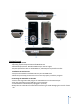
ThisiswheretolistentotheFMradioandallofthechannelsavailable.PresstheMenubutton,
scrolldown,andclickrighttoselectRadio.Thenextscreenshouldlooklikethepicturetothe
right.PresstheLeftandRightbuttonstofindthepreferredstation.PresstheDownbuttonto
bringuptheoptionmenuandtheMenubuttontoreturnback.
AddThisPreset
‐PushtheCenterbuttontoaddthecurrentstationtothepresetselection.
DeleteaPreset
‐PresstheRightbuttontoscrollupanddownthelistofpresetstodelete.
‐PushtheCenterbuttontodelete.
ViewallPresets
‐PresstheRightbuttontoscrollupanddownthelistofpresets.
‐PushtheCenterbuttontoplaytheselectedstation.
NOTE:Themaximumnumberofpresetsistwenty.
RecordNow
‐PushtheCenterbuttontorecordthecurrentsongplayingonthe
radio.
‐PressPlay/Pausebuttontostopandresumerecording.
‐PushCenterbuttonandpickyesornotosavethesongornot.
PlayRecording
‐PressRightbuttontoscrollandplaysavedrecordings.