
User manual





46
using advanced functions
Use camera options
Before capturing a photo, press < > to access the
following options:
Before capturing a video, press < > to access the
following options:
To set the quality of your photos or video clips, press
<> → Settings → Photo or Video → Photo
quality
or
Quality
.
Customise camera settings
From the viewfinder, press < > → Settings →
Setup to access the following options:
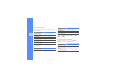
Option Function
Shooting mode
Change the shooting mode
Resolution
Change the resolution option
White balance
Adjust the colour balance
Effects
Apply a special effect
Night mode
Set whether to use Night shot
mode
Exposure metering
Select a type of exposure metre
Option Function
Recording mode
Change the recording mode
Resolution
View the resolution
White balance
Adjust the colour balance
Effects
Apply a special effect
Option Function
Viewfinder mode
Change the preview screen
Review
Set the camera to switch to the
preview screen after capturing
photos or videos; Review a
photo or video after capturing it
Option Function