user manual
Manuals
Brands
Samsung Manuals
All in One Printer
All in One Printer ML-1651N
1
2
3
4
5
6
7
8
9
10
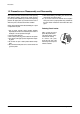
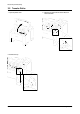
1. Open the printer cover
.
2. Remove the cap.
3. Hold the cap at the both end of the roller
, then
remove the roller
.
Disassembly and Reassembly
3-2
Samsung Electronics
3-2 T
ransfer Roller
1
...
...
8
9
10
11
12
...
...
67