
Operation Manual



3 8
Teletext
Application
Basic Function
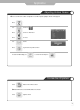
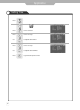
■TEXT On/Off
1. Press "TTX ON" once , then displays the Teletext pages.
2. If you press "TTX ON" once more, Text mode is off.
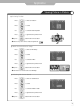
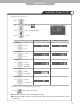
■TOP TEXT
The user guide displays four fields-red, green, yellow and blue at the bottom of the screen. The yellow field
denotes the next group and the blue field indicates the next block.
- Group/Block/Page selection
1. With the blue button you can progress block to block.
2. Use the Yellow button to proceed to the next group with automatic overflow to the next block.
3. With the Green button you can proceed to the next existing page with automatic overflow to the next group.
4. The RED button permits to return to previous selection.
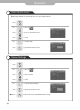
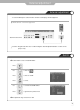
■FLOF TEXT
The teletext pages are colour coded along the bottom of the screen and are selected by pressing the
corresponding coloured button.
- Page selection
1. Press the Index button to select the index page.
2. You can select the pages, which are colour coded along the bottom line with the same coloured buttons.
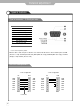
Special T
eletext Function key
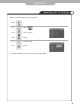
■MIX : In the mix mode display, the underlying video and the teletext page display are both simultaneously
visible on the screen. This command turns the display to mix mode and is enabled only in the text
mode.
■STORE :
This command stores the user defined favorite pages. This command is enabled only if the list
mode is active.
■FLOF LIST : This command toggles between list mode and current. Text mode(FLOF, TOP or normal)
■SIZE : Toggle the display page size between double-size top, double-size bottom and normal.
■
HOLD : The update of the current display page is halted so that the content will not be changed.
■UPDATE : Press this button to view the updated teletext page.
■INDEX : Return to the index page.
■TIME : In TV mode this command makes clock display at right-top corner.
In TEXT mode if this command is given the sub page mode is activated.
■REVEAL : Press this button to display the concealed information. Such as solutions of riddles or puzzles.
RED, GREEN, YELLOW, BLUE-In the TOP/FLOF automatic navigation mode, these keys select
and display the linked page.