
Operation Manual



3 3
Viewing Picture in Picture
Application
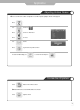
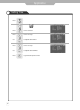
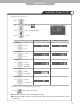
● Main Screen/Sub Screen Swap
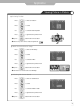
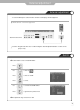
● Selecting Sub Screen Sound
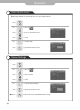
● Selecting Position
Or press
button on the remote control.
Sub-screen position can be selected only from the .
Press to move to "Position".
Press to select.
Use to select the desired position.
Press to go back to the previous menu.
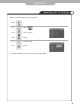
Or press
button on the remote control.
The main screen and the sub screen will swap.
Press to move to "PIP Swap".
Press to select.
Use to select the "YES".
Press to go back to the previous menu.
Or press
button on the remote control.
Press to move to "Sound Select".
Press to select.
Use to select the "Main" or "Sub".
Press to go back to the previous menu.