
User Manual




20
6. - SETUP
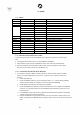
6.1 – MENU
MENU
SUBMENU 1
SUBMENU 2
DESCRIPTION
ADDRESS
001 – 512
Set the DMX address
CHANNEL
1 / 4 / 7
Set channel mode
SLAVE
Slave
Set SLAVE mode
STAT
R: 000 – 255
Set RED level
G: 000 – 255
Set GREEN level
B: 000 – 255
Set BLUE level
W: 000 – 255
Set WHITE level
ST: 0 – 9
Set STROBE level
COLOR
01 – 51
Set color
SOUND
SOUND 1 – SOUND 3
SEN 0 – 9
Set sound mode and sensitivity
AUTO
AUTO 1 – AUTO 6
SP 1 – 9
Set Auto mode and speed
LINK
ON
Pairing wireless
RELEASE
+ / -
Unparing wireless
WIRELESS
ON / OFF
Wireless activation
TEMP
xx °C
Temperature value
REMOTE
On / Off
Switch ON/OFF the IR receiver
VERSION
V 1.02
Software version
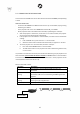
6.2 – MASTER/SLAVE MODE WITH CABLE
In this mode, more units can be linked together as a single chain and work in a synchronized
way.
• Link together all the units from the connector DMX OUT to DMX IN.
• Define the first unit of the chain as MASTER, all other units must be set in SLAVE mode.
• Operate the Master unit in Automatic mode or Static mode to operate the entire system.
The entire chain of Slave unit will act as the Master unit
6.2.1 – MASTER/SLAVE MODE WITH WIRELESS
• It is possible to operate in Master / Slave mode also in Wireless mode, without the DMX
cables, by using the LINK function in the menu, in order to link or unlink the master from
the slave
1. Select the SLAVE unit;
2. Under the RELEASE submenu, press and hold the buttons + or – until the writing SUCCESS
appears. Now the SLAVE unit is ready to receive the signal of the MASTER;
3. Set the SLAVE unit under the menu SLAVE e press ENTER;
4. Select the MASTER and repeat the procedure indicated in the point 2. NOTE: In the MASTER
unit there is not a specific function to set the MASTER. Please follow the instructions in the
following points.
5. In the MASTER unit go under the menu LINK and press ENTER. Some little dots in the display
indicate that the unit is linking to the SLAVE.
6. Now for the MASTER unit it is possible to select one of the automatic or static functions. The
SLAVE unit will follow the MASTER. Please repeat the points 2 and 5 in case of this link does not
start.