
User manual





5-18
Operation
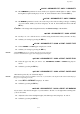
The Banner mode is available from the flatbed scanner only, since 4 or 9 passes will be required on the
same page.
The Mosaic mode is available from the ADF scanner only, since 2 or 4 pages will have to be scanned
before printing, and page changes are not managed on the flatbed scanner..
Paper tray selection
This selection is available only if the printer includes at least two trays. For more information, refer to
paragraph Paper tray, page 5-22.
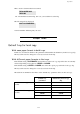
Duplex mode (option or depending on model)
This selection is not available for flatbed copies (page changes are not managed on the flatbed scanner)
or for the Identity Card mode.
Case of a duplex printer (option or depending on model) with compatible paper type:
Case of a simplex or duplex printer with incompatible paper type:
Feuilles analysées
1
2
1
3
2
4
2 sur 1
4 sur
Copie en MOSAÏQUE
Copie en BANNER
Feuille analysée
1 vers 4
1 vers 9
1
2
12
3
4
1
1 sur 1
1
1 vers 1
Sortie Sortie
A
A
A
A
BANNER Copy mode
MOSAïC Copy mode
Analyzed sheets
Output Analyzed sheets Output
1 to 1
2 to 1
4 to 1
1 to 1
1 to 4
1 to 9
1>DUPLEX ->DUPLEX
2 1-SIDE ->DUPLEX
3 DUPLEX ->1-SIDE
4 1-SIDE ->1-SIDE
1>1-SIDE ->1-SIDE
2 DUPLEX ->1-SIDE