
User manual





Operation
5-15
842 OK - ADVANCED FCT / COPY / ZOOMING
The ZOOM setting is used to reduce or enlarge part of the document by choosing the
original and the zoom value to apply to the document, 25 to 400 %. Enter the zoom value
required using the keys of the digital key pad. Validate the choice with the OK key.
The special zoom values (141, 97, 94, 78, 71) are displayed with explanatory text (xx->yy).
You can enter any zoom value at any time via the numeric keypad; if the value entered does
not correspond to a special value, the explanatory text disappears.
If a special zoom value is entered again, the explanatory text should reappear.
Validating a choice with the OK key will cause this choice to be set as the default value
and a 10-second time delay to be set for the photocopier; if activated before the end of this
time delay, the next local copy will have this same zoom value applied as a default.
Validating a choice with the COPY key will cause the local copy slip to be entered with
the selected zoom value.
843 OK - ADVANCED FCT / COPY / ASSEMBLED
The ASSEMBLED parameter is used to define the choice of your printer outputs; either
assembled or not assembled. Validate the choice with the OK key.
844 OK - ADVANCED FCT / COPY / ORIGIN
If you wish, you can change the origin of the scanner.
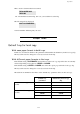
By entering new values of X and Y given in mm (X < 210 and Y < 286), you will move the
scanning zone as shown on the figure below.
Select the X and Y coordinates with keys or .
Set the required coordinates with the numeric keypad or or . Confirm your setting
by pressing key OK.
845 OK - ADVANCED FCT / COPY / CONTRAST
The CONTRAST parameter is used to select the photocopy contrast. Adjust the contrast
using keys
and, then validate the choice with the OK key.
You can also directly adjust the desired contrast using the key, press this key several
times until the required adjustment is obtained without using
845.
scanned area
y
x
END OF SHEET
TOP OF SHEET