
User manual





3-18
Setting your machine
Your terminal is now configured.
SETTINGS
The settings are divided into several categories:
• the standard settings define the connection type and frequency to the Internet as well as the
transmission type for your documents,
• the E-mail sorting defines treatment for all stored E-mail messages received.
Standard settings
Your machine has two types of settings that let you define:
• The type and frequency of the connection to your ISP.
• Type of transmission over the Internet.
At any moment you may print the settings of your machine to know their status.
Selecting the connection type
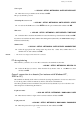
941 OK - INTERNET / SETTINGS / CONNEC. TYPE
Select one of the connection options among SET TIMES, PERIODIC or ON DEMAND and
press OK to confirm.
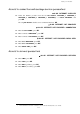
SMTP AUTHENT.
9241 ACTIVATION With or Without
SET TIMES
an Internet connection is established every day at
9:00 am, 12:30 am and 5:00 pm
A
.
A. To avoid Internet access saturation, the automatic connection will occur in reality 12 minutes,
give or take, around the requested time.
PERIODIC
an Internet connection is established every 3 hours
1
(default value).
ON DEMAND
an Internet connection is established at your request by
IMMED. ACCESS (refer to paragraph Internet
Connection, page 3-21).
IMMEDIATE
document transmission will occur immediately at each
transmission request.
DURING
CONNECTIONS
transmissions will only occur at programmed connections
of
SET TIMES or PERIODIC TYPE.