
User manual





3-14
Setting your machine
Server port
2552 OK - SETUP / NETWORKS / SNTP SERVER /PORT
Enter the server port number, then validate with OK.
The port by default is port 123.
Activating the server access
2553 OK - SETUP / NETWORKS / SNTP SERVER / STATE
To activate the SNTP server, select WITH in the drop-down menu then validate with OK.
Time zone
2554 OK - SETUP / NETWORKS / SNTP SERVER / TIME ZONE
Select the time zone where the terminal is located from the drop-down list then validate with OK.
If you have activated the automatic summer time management (menu 212), the TIME ZONE setting is
initialised automatically.
Summer time
2555 OK - SETUP / NETWORKS / SNTP SERVER / SUMMER TIME
Select the appropriate time setting in the drop-down list: winter time, summer time +1 or
summer time +2, then validate with OK.
Remark : This menu is not displayed if the menu 212 is activated.
PC de-registering
This menu lets you delete one or more PCs connected to the terminal via the LAN.
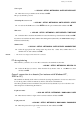
256 OK - SETUP / NETWORKS / DE-REG. PC
Select the PC that you want to delete from the list by means of the and arrows, then
validate with OK.
Case of connection to a domain (for instance with Windows NT,
2000
or XP)
The terminal can identify itself on the local network by using the parameters of a user account, before
it can, among others, archive documents by means of the Scan to Disk function.
Once these parameters have been filled in, they will be used by default, if you do not declare a user
name and password when using the function.
Login user name
2541 OK - SETUP / NETWORKS / DOM LOGIN / USER
Enter the user name for login on the local network, then validate with OK.
Login password
2542 OK - SETUP / NETWORKS / DOM LOGIN / PASSWORD
Enter the password for login on the local network, then validate with OK.