
User manual





Setting your machine
3-13
IP address
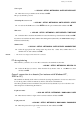
2532 OK - SETUP / NETWORKS / LOCAL NETWORK / IP ADRESS
Enter the IP address of your terminal and press OK to confirm.
Sub-network mask
2533 OK - SETUP / NETWORKS / LOCAL NETWORK / SUBNET MASK.
Enter the sub-network mask of your terminal and press OK to confirm.
Gateway address
2534 OK - SETUP / NETWORKS / LOCAL NETWORK / GATEWAY
Enter the IP address of the network gateway and press OK to confirm.
IEEE address (or Ethernet address) or MAC address
2535 OK - SETUP / NETWORKS / LOCAL NETWORK / IEEE ADRESS
The Ethernet card of your terminal already has an unmodifiable, yet consultable, IEEE address.
Netbios names
These names, which can be used with the network options, are used to identify your terminal
machine from a PC connected to a local network (for instance with the name
"IMP-NETWORK-1").
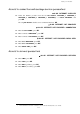
2536 OK - SETUP / NETWORKS / LOCAL NETWORK / NETBIOS 1
2537 OK - SETUP / NETWORKS / LOCAL NETWORK / NETBIOS 2
Enter the selected name (15 characters max) and press OK to confirm.
The WINS1 and WINS2 servers, used with the network options, allow access to terminals on
other sub-networks by means of their NetBIOS name.
These two addresses must be filled in for the Scan To Disk function.
2538 OK - SETUP / NETWORKS / LOCAL NETWORK / WINS SRV. 1
2539 OK - SETUP / NETWORKS / LOCAL NETWORK / WINS SRV. 2
Enter the IP address of each server, then validate with OK.
SNTP server configuration (depending on model)
The terminal can automatically update its date and time when connecting to an SNTP server.
Server address
2551 OK - SETUP / NETWORKS / SNTP SERVER / ADDRESS
Enter the name of the SNTP server, then validate with OK.
This name can be in the form of an IP address, a DNS address or a NetBIOS name.