
User manual


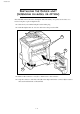


Installation
1-19
TELEPHONE AND LAN CONNECTION
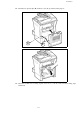
Plug the end of the telephone line (F) into the terminal socket (D) and the other end into
the wall telephone socket.
LAN connection (depending on model). Plug the end of the LAN cord (as provided by your
network administrator) into the socket (C) of your terminal and the other end into your
local network port dedicated to your terminal.
POWER LINE CONNECTION AND SWITCH ON
Caution - Refer to safety procedures in the chapter on Safety and Environment.
Plug the end of the mains power cord (G) into the socket (E) of the terminal and the other
end in the wall outlet.
Set the On/Off switch to position "I" (On).
After a few seconds, when the printer has warmed up, the date and time will appear. To adjust the
language and time of your terminal, refer to paragraph Setting your machine, page 3-1.