
User manual




Installation
1-15
INSTALLING THE DUPLEX-UNIT
(DEPENDING ON MODEL OR OPTION)
After installation and connection, the duplex-unit will enable you to print, receive faxes or to
receive local photocopies in duplex mode.
Switch off your terminal and pull out the mains plug.
Take the duplex unit out of its box and remove the protective film.
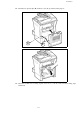
Remove the connector cover (C) to obtain access to the connector.
Clip the connector of the flat cable (E) of the duplex unit in the connector (D) located at
the bottom left hand side of the terminal.
B
C
A