
User manual




Installation
1-13
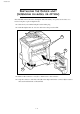
INSTALLING THE SECOND PAPER TRAY
(DEPENDING ON MODEL OR OPTION)
1. Remove the second paper cassette unit
and tray 2 from their packaging, inclu-
ding the protective tape used to hold
the various components in place.
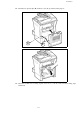
2. Position the printer above the additio-
nal paper tray unit. Align the coupling
pins of the additional paper tray unit
with the corresponding notches in the
bottom of the printer.
3. Remove the paper tray cover. 4. Press the support plate located on the
paper tray until it locks into position.