
User manual




1-12
Installation
ADJUSTING THE ORIGINAL DOCUMENT OUTPUT TRAY
Depending on the size of paper to scan, A4 or LGAL (LEGAL) adjust the supply stop.
LOADING PAPER IN MANUAL MODE
When printing on special paper, such as 60 to 160 g/m
2
maximum color paper or transparent file
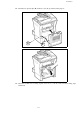
(laserprinter compatible), you should load the paper manually, up to 10 sheets maximum. Insert your
sheet of paper or film between the two feed pawls 1 and 2 located on the paper tray cover until it stops
in the printer.
Adjust to the size of the paper or film using the paper size guide 1 or 2.
1
2