
User manual



6-12
Maintenance
Press the OK key on the scanner control panel. The display shows:
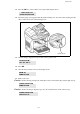
Insert the gauge card (supplied with the drum cartridge) into the card reader ensuring that the
chip is entered as shown in the drawing below.
The following is displayed on the scanner control panel screen:
Press OK.
Once the chip card has been read, the display shows:
Remove the card.
Caution - If the following is displayed, check that you have inserted the chip card the right way up:
Caution - If the following is displayed, get out your card and insert it in the other way up.
TUE 02 APR 13:39
INSERT GAUGE CARD
CHANGE DRUM ?
YES= OK - NO= C
DRUM OK
REMOVE CARD
CANNOT READ CARD
REMOVE CARD
CANNOT READ CARD
CHECK WAY UP
Green arrow