
User manual




6-22
Maintenance
Date en cours : 28 août 2002
6&$11(5,1&,'(176
6FDQQHUSDSHUMDP
When a paper jam occurs, the following message appears on the control panel screen
REMOVE DOCUMENT.
If jams often occur in a specific part of the unit, the latter needs to be checked, cleaned or repaired.
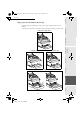
+ Open the scanner cover by pressing key (A)
+ Remove the jammed paper (B) without tearing it
+ Then, close the scanner cover
A
B
MFL 251153211A_MF34 Sagem Gb.book Page 22 Mercredi, 28. août 2002 4:30 16