
User manual





3
EN
Installation Guide
Contained in the Packing
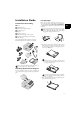
1 Device
‚ Device
2 Telephone handset
ƒ Telephone handset
3 Spiral cable for t elephone handset
„ Spiral cable for telephone handset
4 Document Support
… Document support
5 Paper Tray
† Paper tray
6 Document Outlet Tray
‡ Document outlet tray
7 Mains Cable
ˆ Mains cable with plug (country-specific)
8 Telephone Cable
‰ Telephone cable with plug (country-specific)
9 Starter Cartridge
Š Starter cartridge
User Manual
User manual with installation guide (not depicted)
Installation-CD ( Type 4)
Installation-CD (LF¦3170, LF¦3175) (not depicted)
Verpackungsinhalt
Missing Package Contents
Attaching the Document Support
Attaching the Document Supp ort
Insert the document support into the two openings in the
cover. The document support should snap securely into
place.
Dokumentenhalter anbringen
Loading Paper
Requirements
Before you can receive documents or make copies, you
must load paper into the device. Please use only appropri-
ate paper in standard format A4 · 210¦×¦297 millimetre
· preferably80¦g/m
2
. Follow the specifications in the tech-
nical data.
Paper
Preparing Paper
1 Remove the cover from the paper tray.
2 Put in only as much paper as will fit under the raised
limit markers on the upper edge of the paper tray (see
also the drawings on the cover of the paper tray). You
can load up to 250 sheets.
3 Press the paper down until the lever (A) snaps into
place at the rear of the paper tray.
If one of the parts is missing or damaged, please con-
tact your retailer or our customer service.
Separate the paper sheets by fanning them out, then
align them by tapping edge of the stack lightly
against a flat surface. This will prevent several sheets
of paper from being drawn in all at once.
If you would like to print on an input sheet (for
example, forms or stationery), place the input
sheet face down in the paper tray, with the top of
the page toward the rear.
Forms that have been printed out by a laser print-
er are not suitable for further printing. This can
lead to a paper jam.