
Operation Manual




5 - Information / Configuration
SAGEM F@st™ 1704 Reference Manual - 253272861-A Page 5-63
Sagem Communications SAS document. Reproduction and disclosure prohibited
Add
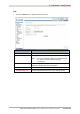
• Click on the Add button to display the following screen:
Field Action
Name
Enter a representative name.
Enable
Select from the scroll down list:
• Disable: To disable the QoS queue entry
• Enable: To enable the QoS queue entry
Interface
Select from the scroll down list:
• Blank
• 8/35: Interface name.
Queue Precedence
Select from the scroll down list:
• Blank
• 1: High priority for this queue,
• 2: Medium priority for this queue,
• 3: Low priority for this queue.
Note: A high priority leads to low packet loss.