
Operation Manual




5 - Information / Configuration
SAGEM F@st™ 1704 Reference Manual - 253272861-A Page 5-59
Sagem Communications SAS document. Reproduction and disclosure prohibited
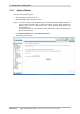
Add
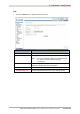
• Click on the Add button to display the following screen:
Field Action
User Name
Enter a representative name for the LAN device.
MAC Address
Enter the MAC address of the required LAN device.
Note: To find out the MAC address of a Windows based
PC, open a command window and type
“ipconfig /all”.
Days of the week
Select the days of the week on which the restriction is
effective by checking the corresponding box.
Start Blocking Time
Enter the required blocking start hour (for example 08:00).
End Blocking Time
Enter the required blocking end hour (for example 20:00).