
Operation Manual





4 - Configuration of network parameters
Page 4-4 SAGEM F@st™ 1704 Reference Manual - 253272861-A
Sagem Communications SAS document. Reproduction and disclosure prohibited.
4.2 Status of the DHCP server
To obtain the status of the DHCP server:
1. Open your browser.
2. Enter the router’s IP address (by default http://192.168.1.1) or enter the following URL
http://myrouter
3. In the login screen that appears, enter "admin" in the "User Name" field and "admin" in the
"Password" field (see note).
Note
The User name and Password values depend on the level of security. This
information is provided by your Internet Service Provider (ISP).
4. Click on the OK button to validate.
5. Select Advanced Setup menu, then select the LAN menu.
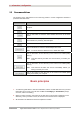
The following screen appears:
Field Description Display
IP Address
Displays the sub-network address 192.168.1.1
Subnet Mask
Displays the sub-network mask of the IP network. 255.255.255.0
Start IP Address
Displays the first address attributed by the DHCP
server.
Note : This IP address must belong to the same
sub-network as that of the local network.
192.168.1.2
End IP Address
Displays the last address attributed by the DHCP
server.
Note : This IP address must belong to the same
sub-network as that of the local network.
192.168.1.254
Leased Time (hour)
Displays the period (in hours) for obtaining an IP
address for a terminal.
24