
Operation Manual




5 - Information / Configuration
SAGEM F@st™ 1704 Reference Manual - 253272861-A Page 5-99
Sagem Communications SAS document. Reproduction and disclosure prohibited
802.1x
Object: The "802.1x" standard is based on the EAP protocol (Extensible Authentication
Protocol). This enables users of the Wi-Fi network to be authenticated using a
"RADIUS" authentication server (Remote Authentication Dial-in User Service).
In this case, the WEP key is used exclusively for data encryption.
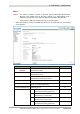
• Select the security according to the 802.1x protocol from the scroll down list; the following
screen appears:
Field Action/Meaning Default value
RADIUS Server IP
Address
Enter the IP address of the "RADIUS"
authentication server.
0.0.0.0
RADIUS Port
Enter the port used for the "RADIUS"
authentication server.
1812
RADIUS Key
Enter the secret key shared between the
authentication server and its clients
-
WEP Encryption This field is always active (Enabled). Enabled
Encryption Strength
Select 64-bit or 128-bit for an encryption at
64 bits or 128 bits respectively.
128-bit
Current Network Key
Select key 2 or 3.
2
1
This field is empty or displays the key
value entered earlier (greyed out)
[Not modifiable]
2
Enter the encryption on the key you
selected in the "Current Key".
12345678901234
3
Enter the encryption on the key you
selected in the "Current Key".
12345678901234
Network Key x (1 to 4)
4
This field is empty or displays the key
value entered earlier (greyed out)
[Not modifiable]