
Operation Manual




5 - Information / Configuration
Page 5-96 SAGEM F@st™ 1704 Reference Manual - 253272861-A
Sagem Communications SAS document. Reproduction and disclosure prohibited
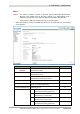
Field Action/Meaning Default value
Enable WSC
Check the box to activate WSC.
Disabled
Select SSID
Select the "SSID" of your choice from the scroll down list
(sagem or Guest).
SAGEM
Network
Authentication
From the scroll down list, select the security adapted to
your router's wireless network.
The list suggests the following choices:
• Open: There is no protection for the wireless network
(Open System)
• Shared
• 802.1x : Activation of the 802.1x standard
• WPA: Activation of WPA (Wireless Protected Access)
• WPA-PSK: Activation of WPA-PSK
• WPA2: Activation of WPA2
• WPA2-PSK: Activation of WPA2-PSK
• Mixed WPA2/WPA: Activation of Mixed WPA2/WPA
• Mixed WPA2/WPA-PSK: Activation of
Mixed WPA2/WPA-PSK
This choice will modify the Wireless configuration screen.
Open
WEP
Encryption
Select from the scroll down list:
• Disabled to not use WEP encryption.
• Enabled to use WE encryption (see subsection WEP).
Disabled