
Specifications






48
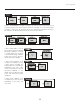
BLANKING (TOP, BOTTOM, LEFT, and
RIGHT): Crop the image as desired so that
unwanted edges are removed from the display
(changed to black—see right). Blanking
defines the size of the Active Input Window,
or area of interest. Range of adjustment
depends on the source resolution and other
factors.
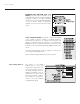
PLUG & DISPLAY (EDID): By default, a Plug & Play (EDID)
source outputs a signal according to the EDID information
provided by the projector. To override this information and
display in a different format (for example, if your Plug & Play
[EDID] device does not support the projector’s resolution and/or
frequency), select the desired Plug & Play (EDID) resolution from
the list.
Any daisy-chained projectors will also display according to the
chosen Plug & Play (EDID) format.
EDID = Extended Display Identification Data standard.
Use options in the Image
Settings menu to alter your
image without affecting its size
or position. Changes made to
the Image Settings menu are
applied immediately and are
saved when you exit the menu
(press Exit or Menu ). Options
not available for the projector
model or source are disabled
and appear dim (gray).
Image Settings Menu ➤
Section 3: Operation Section 3: Operation