
Specifications





20
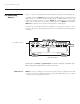
Sources connect to the Input Panel located at the back of the projector. See Figure 2.9.
The upper right corner (INPUT 1) typically accepts an RGB signal from an external analog
RGB source, or it can also be used for YPbPr signals or additional video sources. Just
beside these BNCs, the DVI-I connector (INPUT 2) accepts digital or analog display
signals from a computer. Connect analog composite video at INPUT 3 or
S-video at
INPUT 4 from devices such as VCRs, laser disc players or DVD players.
There are also several optional interfaces available for connecting other sources— these
interfaces slide into the remaining unused option slot, and can be done while the projector
is running.
Figure 2.9 Input Panel
NOTES: 1) See Section 6, Specifications for details regarding compatible inputs.
2) Use high quality shielded cables only for all connections.
INPUT 1 consists of 5 BNCs (connectors) and can be used as the input from the DHD
Controller. This projector supports multiple sync types with RGB signals: sync-on-green,
composite sync, and separate H & V syncs.
RGB Signals ➤
2.3 Connecting
Sources
RGB (BNC)
Section 2: Installation and Setup Section 2: Installation and Setup
From DHD Controller