
User's Manual






27
Operation
Connect Ethernet Cabling
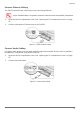
The PM-521 provide have a Ethernet port for connecting Ethernet.
Use a shielded cable is required to maintain emissions and susceptibility compliance.
1. Open the left I/O compartment cover. See “Opening the I/O Compartment Cover” on page
25.
2. Connect LAN cable to Ethernet port on the PM-521.
Connect Audio Cabling
Figure 30. Connect Ethernet cabling
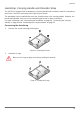
For higher audio quality, you can send sound through external audio devices such as speakers,
headphones, or earphone using audio connector.
1. Open the left I/O compartment cover. See “Opening the I/O Compartment Cover” on page
25.
2. Connect the audio cable.
Figure 31. Connect Audio Cabling