
User's Manual




25
Operation
Connecting to External Cabling
To prevent damage to the device, connect all cabling and accessories before
powering up the device.
Connect USB Cabling
The PM-521 have one USB 3.0 and one USB 2.0 ports for connecting USB devices, such as a
digital camera, scanner, printer, modem, and mouse. The USB ports support USB 2.0 or USB 3.0
devices.
1. Open the left I/O compartment cover. See “Opening the I/O Compartment Cover” on page
25.
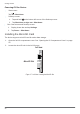
2. Connect to USB device via USB cable.
Figure 28. Connect USB 2.0 Cabling