
User's Manual




20
Getting Started
ON OFF
3.0
2.0
SD
Powering Off the Device
Start screen:
Tap > Shut down.
Desktop screen:
1. Tap and hold at the bottom left corner of the Desktop screen.
2. Tap Shut down or sign out > Shut down.
Bot
h
Start screen and Desktop screen:
1. Display charm bar and tap Settings.
2. Tap Power > Shut down.
Installing the MicroSD Card
The device supports microSD card for easier data storage.
1. Open the left I/O compartment cover. See “Opening the I/O Compartment Cover” on page
25.
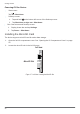
2. Locate the microSD slot in the left I/O parts.
Left view
MicroSD Slot
Figure 17. Left View: Locating the MicroSD Slot