
User's Manual




14
Introduction
ON OFF
3.0
SD
2.0
Side View
Left view
Right view
1
6
2
7
3
8
4
9
10
5
11
13
12
14
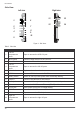
Table 6. Side View
Figure 4. Side Views
No Item
Description
1
Left I/O
compartment
cover
Open to access the USB 2.0 port.
2 Micro HDMI Connect HDMI devices to the PM-521.
3 MicroSD slot Insert microSD card in to the slot.
4
Left I/O
compartment
cover
Open to access the left I/O ports.
5 Tether hole Stylus can be tethered to it.
6 USB 2.0 Connect USB devices to the PM-521.
7 Battery switch Switch to ON to provide power from the backup battery.
8 USB 3.0 Connect USB devices to the PM-521.
9 Audio jack Connect a 3.5 mm jack for a headphone or external speakers.
10 Ethernet Connect the PM-521 to an Ethernet (RJ-45) cable.
11 DC-IN jack Insert power connector to charge battery.
12 RS-232 Connect the PM-521 to a serial device.
13 DC-IN cover Open to access the DC-IN jack.
14
Right I/O
compartment
cover
Open to access the right I/O port.